
ME
Menna AbdalazizUI/UX Designer
May 21, 2026
0.12 seconds
Have you ever asked yourself: Why do we love some websites or apps and feel comfortable with them from the first moment, leaving us with a good impression as an experience, while others bore us or leave us feeling lost?
The secret isn't just in the UI, like colors or fonts. The real secret lies in understanding the people you're designing for, understanding how they see, think, and interact with it.
This is what led me to start reading one of the most powerful books in UI/UX design: "100 Things Every Designer Needs to Know About People" 💙
It's a golden guide that combines psychology and design art, connecting them simply and presenting well-thought-out principles that deepen our understanding of design by helping us understand the users we're designing for. 👌🏻
The book's core idea is that design isn't just about aesthetics; it must be based on a conscious and deep understanding of how people think and behave. This understanding allows you to deliver an effective and user-friendly experience that meets their needs based on sound scientific and psychological principles.
As I read the book and explore these principles, I'll be sharing the most important lessons you can learn from it in a simplified way, so we can deepen our understanding of users together and design effectively. They have smarter experiences that are more aligned with their needs... 💪🏻💡
And we'll start with the first chapter of the book, titled "How People See," which begins with an important fact: that "sight" is the strongest of all the senses, and half of our brain's resources are dedicated solely to receiving and interpreting what we see. What our eyes capture isn't the whole story, because the true picture is formed inside our brains, which are what draw it and give it meaning. In reality, we "see" with our minds before we see with our eyes! 👌🏻
Now, let's move on to the first rule in the book:
📌 Rule number (1): What You See Isn't What Your Brain Gets!
Which states the following 👇🏻: What you expect people to see on your website or app isn't necessarily what they actually see!
Because their perception of your design depends on their background, their familiarity with the content they're viewing, and their preconceived notions...
As a designer, you can guide and persuade the user to see the content in a specific way through your presentation. The presentation not only conveys the content but also shapes people's understanding of it.
Finally, stay tuned for the next rule; each rule brings us closer to a deeper understanding of the user...💡✨
#100_Things_Every_Designer_Needs_to_Know_About_People_in_Arabic #uiuxdesign #Psychology
Has it ever happened to you that you were engrossed in reading something on a website, and suddenly an ad popped up on the side, grabbing your attention and distracting you? And no matter how hard you tried to ignore it, your eyes kept going to it automatically! 👀 This is exactly what our second rule today is about in the book "100 Things Every Designer Needs to Know About People" 💙, which we're still exploring in the first chapter, "How People See." 📌 Rule #2: Peripheral Vision Is Used More Than Central Vision To Understand The Essence of What You See! Which states the following 👇🏻 As humans, we have two types of vision: central vision and peripheral vision. Central vision is what we use when we look directly at things and see details, while peripheral vision is for seeing the rest of the visual field (the areas you see in the periphery of your field of vision without looking directly at them). The importance of central vision is that it helps us identify specific objects, while the importance of peripheral vision lies in its ability to help us understand the world around us and gather information about the type of scene we are looking at. 👌🏻 Here, you must know, while designing your product, that people use peripheral vision when looking at a computer or phone screen. They usually grasp the essence of the content and decide on the topic of the page based on a quick glance through their peripheral vision. This doesn't mean ignoring the center of the screen, as it is important for central vision, but rather not ignoring what appears in the peripheral vision of users. 😊 So always make sure that The information and content in peripheral vision clarifies the purpose of the page and the product as a whole. If you want users to focus on a specific element on the screen, completely avoid placing any moving or flashing elements in their peripheral vision, as they will immediately notice them and their gaze will be drawn to them. 👌🏻 Finally, stay tuned for the next rule; each rule brings us closer to a deeper understanding of the user. 💡✨ #100_Things_Every_Designer_Needs_to_Know_About_People_in_Arabic #uiuxdesign #Psychology
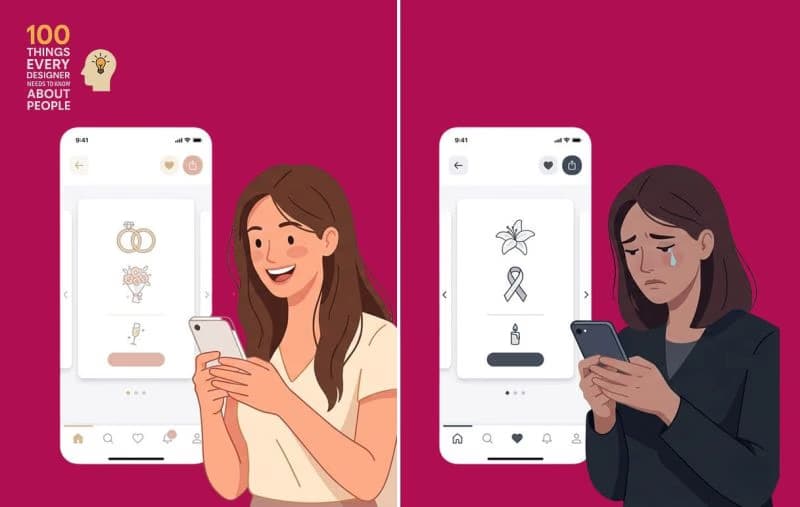
Have you ever chosen a color in a design because it is "clear and its meaning is well-known," only to discover later that in another country, the same color conveys a completely different message..?!👀

These are most of the questions I faced in interviews. I hope they benefit you, and for the most part, there are no questions outside of these.



Book a 30-min call to discuss your project and next steps.

Message us directly on WhatsApp for a quick reply and to discuss your idea.